NSWI142: Web Applications
2. HTML Form
Štěpán Stenchlák, KSI
stepan.stenchlak@matfyz.cuni.cz
Points and grading
| 12 | Labs attendance |
| 12 | Labs bonus points |
| 15 | ReCodEx mandatory tasks |
| ≥ 9 | ReCodEx optional tasks |
| 15 | Lab test |
| 63 | In total |
|---|
| ≥ 61 | excellent (mark 1) |
| ≥ 54 | well done (mark 2) |
| ≥ 47 | OK (mark 3) |
| < 47 | failed (4) |
Optional final test for 50 points, but only ⅔ of points from above will be counted.
Recap from Lecture 1
- URL
- HTTP, its headers, status codes
- HTML & DOM
- Forms as a way to submit data to server
- CSS selectors and basic properties
- CSS animations
- Box model (width, margin, border, padding)
- Media queries (CSS for printing, dark mode, orientation)
Preliminaries
You should be able to:
- Explain a difference between HTTP GET and HTTP POST.
- Create a static website with form in it.
- Know how to create accessible and semantic forms.
- Know how to do basic CSS.
Exercise: HTML Form
Create a simple HTML form for creating a reservation for today's practical. The form must contain input fields for:
- first name
- second name
- number of reservations
Submit the form to the following URL.
Feel free to use sites such as echo.free.beeceptor.com.
Continue to the next slide once you are done.
Debriefing
- Why do we need a form?
-
What is the difference between GET and POST?
- What happens if you refresh the page?
- What was missing?
Form validation
Where to validate the form and how?
required- field must be filledtype="email"- field must contain a valid email addresstype="number" min="1" max="10"- field must contain a number in the given rangepattern="[A-Za-z]{3}"- field must match the given regular expressionmaxlength="10"- field must not exceed the given length
QA Engineer walks into a bar and he orders a beer. Orders 0 beers. Orders 99999999999 beers. Orders a lizard. Orders -1 beers. Orders a ueicbksjdhd. First real customer walks in and asks where the bathroom is. The bar bursts into flames, killing everyone.
Make errors understandable.
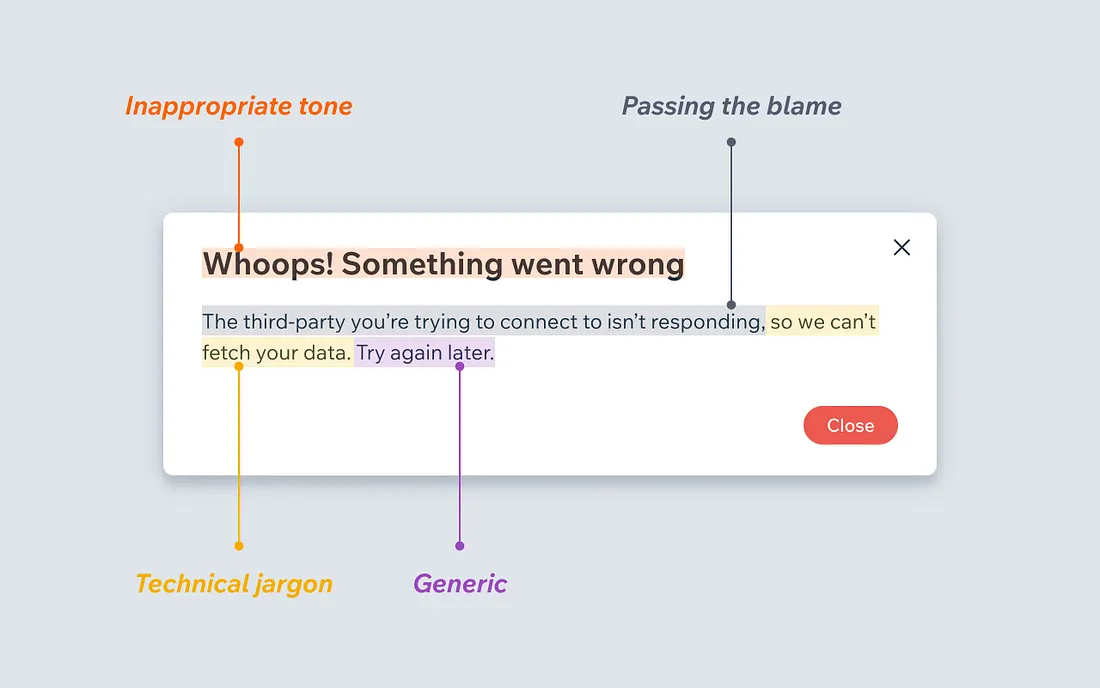
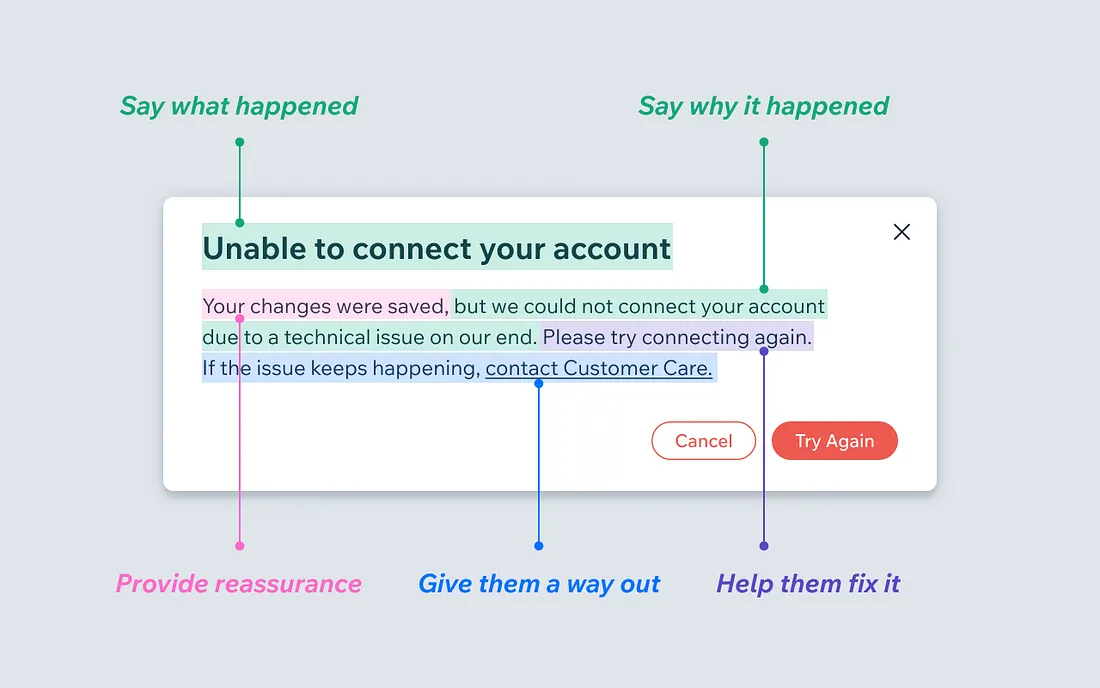
When life gives you lemons, write better error messages, Wix UX, Jenni Nadler, Medium
Do not over-validate
Use warnings instead of errors
name\@tag\ with\ space@[IPv6:0123:4567:89AB:CDEF:0123:4567:89AB:CDEF]is RFC2822 valid e-mail address- Pablo Diego José Francisco de Paula Juan Nepomuceno María de los Remedios Cipriano de la Santísima Trinidad Ruiz y Picasso
- Some countries do not use ZIP codes
- Microsoft banned a user from Xbox Live for putting Fort Gay, West Virginia as his address.
Accessibility (a11y) and semantic forms
- Use
<label>to associate labels with inputs - Use
<fieldset>and<legend>to group related inputs - Use
<input>types appropriately (e.g.,email,tel,url) - Ensure proper tab order and keyboard navigation
- Provide clear instructions and error messages
- Use ARIA roles and properties when necessary
aria-labelaria-describedby
What are some good/bad examples of placeholder attribute?
Example of bad form
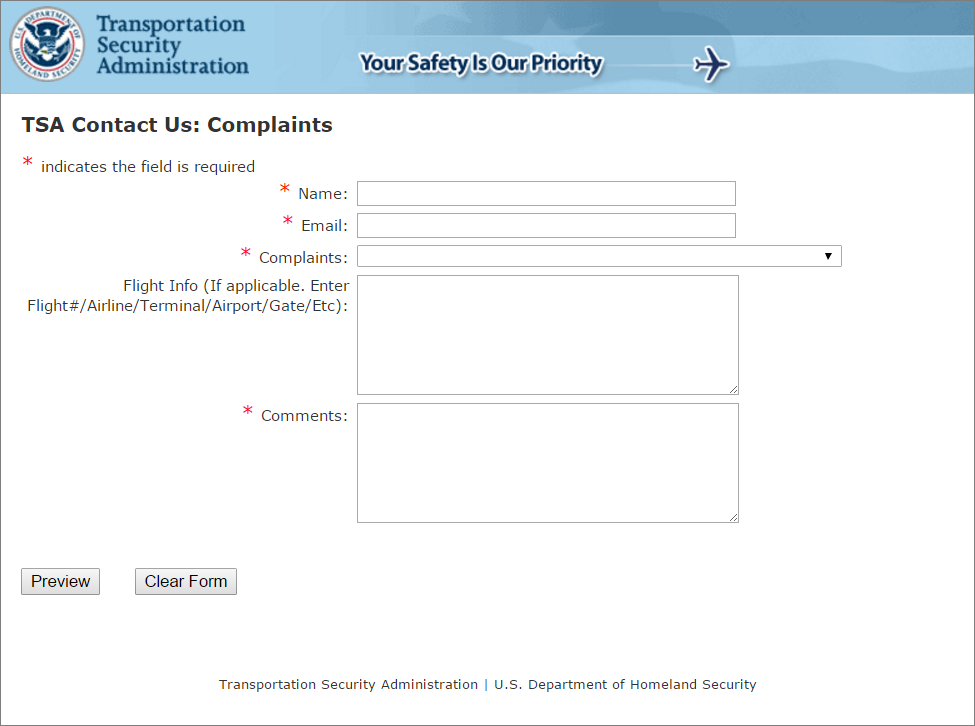
Exercise: Create a good form
- Use all properties we talked about.
- Make the form accessible by using ARIA, labels, fieldsets.
- Style the form using CSS, use
:validand:invalidpseudo-classes.
Testing and evaluation
Have we created a functional form?
Have we created a good form?
Have we created a ....
Measuring the "goodness"
In order to measure we need a metric.
- Usability: Is the form easy to understand and fill out? Are the labels clear and inputs intuitive?
- Accessibility: Can users with disabilities interact with the form? Does it support screen readers and keyboard navigation?
- Validation: Are there proper validations in place to prevent incorrect or incomplete submissions?
- Feedback: Does the form provide clear feedback for errors or successful submissions?
- Performance: Does the form load quickly and work seamlessly across different devices and browsers?
- Security: Are user inputs sanitized and protected against common vulnerabilities like XSS or SQL injection?
- ...
Evaluation
Full and proper evaluation is out of scope of this practical and even subject. Please consider this slide to be a very brief introduction.
The System Usability Scale (SUS) is often used to evaluate after the implementation phase. The method is based on a simple questionnaire and provide a number representing usability. You can find a lot of resources on the internet about SUS. E.g. SUS by uxtweak.
Yet, evaluating after implementation may be too late! In fact, we would like to test at every phase, not only after the implementation. Baseline phases are analysis, design, and implementation. In the analytical phase we can use storyboards. In the design phase we can use paper mockups or low fidelity prototypes
We can also use A/B testing to compare alternatives.
There is much more when it comes to user interface design and evaluation. If you find this topic interesting you can check out User Interface Design and Evaluation (Interactive Technologies) book.
A/B testing

