NSWI142: Web Applications
JavaScript client I.
Preliminaries
Please read this section at least one day prior to the seminar. This section outlines what you are expected to know, be able to do, or prepare in advance. Following these instructions will help you get the most out of the seminar and ensure smooth participation.
Preliminaries
Before the start of the practical, you should be able to:
- Write hello world in JavaScript.
- Use basic JavaScript syntax, e.g. variables, functions, conditionals, loops.
- Run JavaScript using NodeJS or in a browser.
- Create and use JavaScript event handler to change text color on click.
In addition, please familiarize yourself with the JavaScript DOM cheat sheet.
Preliminaries software
This slide applies to you only if you plan to use your own computer for the practical.
Before the start of the practical, make sure that:
- You have a modern web browser.
- An IDE with support for JavaScript would be nice.
Agenda
- Demonstration: JavaScript and a browser
- Demonstration: Events
- Exercise: Basic DOM manipulation
- Exercise: List search
Demonstration: JavaScript and a browser
How to add and execute JavaScript in a HTML website.
The script tag
We can put the JavaScript directly into HTML. Keep in mind that we should properly "escape" any HTML relevant content such as < and >.
      <script type="text/javascript">
        window.alert("Hello world");
      </script>
We can load JavaScript from external resources.
<script type="text/javascript" src="./assets/js/main.js"></script>
When possible, prefer the second option.
Note: Do NOT add JavaScript directly to method handlers in HTML!
DOM Model in JavaScript
HTML is infix serialization of Document-Object-Model (DOM).
<html><body><h1>DOM Example</h1><img src="" alt=""></body></html>
From the perspective of a browser, the above is represented similar to image bellow.
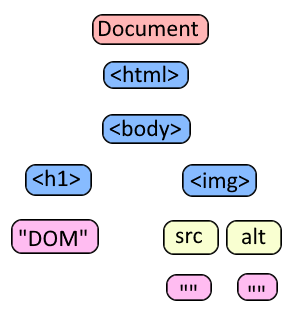
The absence of white spaces is no accident in the HTML above, as comments and white spaces are also part of DOM.
Working with DOM
Traversing
- getElementsByName vs getElementsByTagName
- Node.childNodes vs Element.children
- getElementById, querySelector, querySelectorAll
- ...
Manipulating
- Document.createElement
- Node.cloneNode
- Node.appendChild, Node.removeChild
- Element.innerText, Element.innerHTML
- ...
Demonstration: Events
Events are triggered on certain user actions and other events, e.g., page finished loading, mouse click, etc. Event can be handled using event handler JavaScript code - a function. All event handling is executed using a single thread. Blocking the event causes the website to stop responding.
Event
Different event types utilize specializations of the Event interface.
You can find list of events for window, document, ... in the "Events" section.
Waiting for page load
JavaScript code is executed as soon as it is encountered, if not specified otherwise. We can place the script element at the end of the document. Or, better, we can listen for the event on the document.
      document.addEventListener("DOMContentLoaded", () => {
        document.getElementById("my-element").textContent = "DOM Content Loaded";
      });
Exercise: Basic DOM manipulation
Just a simple warm up exercise.
Basic DOM manipulation
Download this page and update it so:
- Add elements of array
employeesas<li>items incontentlist - Modify all
<h1>headings so that they are numbered (i.e., "1. First heading", …) - Repeat the row in "Delivery plan" 5 times
- Disable all links - i.e., no action on click
Implement the functionality step by step. You are allowed to only put JavaScript code into the existing script tag. Mind proper naming and code-style.
Continue to the next slide once you are done.
Task Complete
Congratulations, if you have followed the instructions, you have just reached the end of this exercise.
Exercise: List search
The objective is to create an application with list search functionality. The application renders a list of products. User can search the list by using filters.
List search
The objective is to create a simple product list with text and atribute based filtering. You can start by downloading this page. The required functionality is described on following slides.
Implement the functionality step by step. You are allowed to only put JavaScript code into the existing script tag. You are allowed to change the surrounding HTML and CSS code. Mind proper naming and code-style.
Continue to the next slide once you are done.
Generate data
In order to test your application we need to generate some data. Employ JSON generator with the following template:
      [
        "repeat(64)",
        {
          "id": "guid()",
          "label": "product()",
          "description": "productDescription()",
          "material": "productMaterial()",
          "price": "price()",
          "category": "enum(camping, garden)"
        }
      ]
Hardcode the generated data into the page. Once the page is loaded, render the list into the HTML ul#item-list element. You may need to pre-process the data.
Continue to the next slide once you are done.
Create a filter form
Implement an HTML form inside the form#search-form element. The form must be located above the list and must contains:
- Text search - an input element with name "search".
- Slider to set maximum price - an input element with name "price".
- Checkbox to show only items from the garden category. It must be an input element with name "garden".
Think about the behavior and implement the event handlers.
Continue to the next slide once you are done.
History and location
Familiarize yourself with the Location, and History APIs, then implement following functionality.
When user open the page read the filter values from the URL query. When user perform a change in the filter, synchronize the change to the URL query.
For example when user search for string "chair" the URL may change to "?search=chair". When user opens a website and URL query contains "search=chair", the text search should be set to "chair".
Bonus assignment
In order to get the bonus point you need to finish application. Once the application is ready upload the file content to the file ~/public_html/product-list.html at webik.ms.mff.cuni.cz. Yes, you are expected to put all into a single file.
Task Complete
Congratulations, if you have followed the instructions, you have just reached the end of this exercise.