NSWI142: Web Applications
HTML form
Preliminaries
Please read this section at least one day prior to the seminar. This section outlines what you are expected to know, be able to do, or prepare in advance. Following these instructions will help you get the most out of the seminar and ensure smooth participation.
Before the start of the practical, you should be able to:
- Explain a difference between HTTP GET and HTTP POST.
- Create a static website and style it with CSS.
- Create a simple HTML form with a text input and a submit button.
Please make sure to bring a pen with you. If possible, please have two distinct colors ready.
Agenda
- The e-mail, the form, ...
- Wireframe
The e-mail, the form, ...
HelpDesk company runs customer support for several products. Every ticket that comes in has to reach the right person: someone in the right team, who has the right skills and speaks the customer's language, and who is working at that moment. The system can only do this well if it knows its agents, so everything starts when a new agent joins.
At the moment, that first step is done on paper. New staff fill in forms by hand, HR retypes them, and details get lost along the way. Customers end up with an agent who can't help them. Management wants a better way
Before you write any HTML ...
Iterations
Using iteration is a development approach where software is built and refined in small, manageable increments. This method allows developers to prototype quickly, gather user feedback, and make improvements in subsequent iterations. It aligns well with agile methodologies, emphasizing adaptability, collaboration, and delivering value to users early and often.
Wireframe
Figma's website wireframe templates:
Take a look at the input elements and try to pick the best for the task at hand.
Work in iterations:
Requirements Understanding → Research → Wireframe → Mockup → Prototype → Evaluation
Review
- What good and bad forms do you know?
- What do we need to implement a form solution?
- How do we design a form?
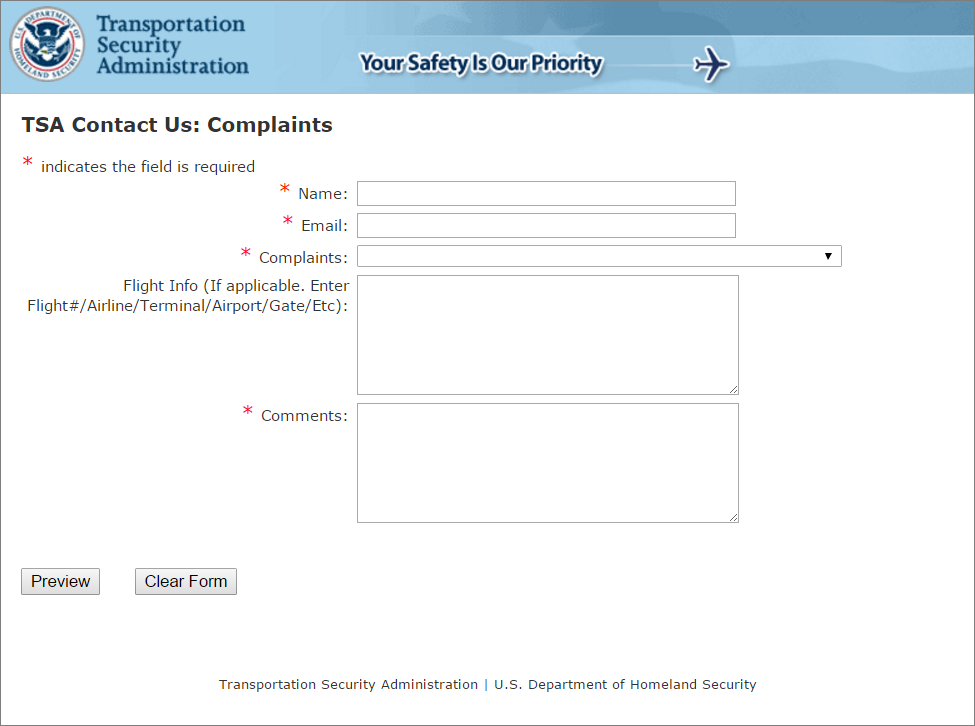
Transportation Security Administration
Let's play a game
See how far you can get in User Inyerface game.
Towards a better form
Both forms have been generated using AI. Try to find issues with the bad form. Next try to find what is good on the good form.
Improving: Basics controls
List of basic controls you should know:
- Password input
- File input
- Checkbox
- Radio
- Select
- Datetime
- Color
- Textarea
- ...
Improving: File upload
- Consider "accept" and "multiple" attributes.
- Consider drag and drop support.
Improving: Accessibility (a11y) and semantic
- <label> - It represents a caption in a user interface.
- <fieldset>, <legend>, - Grouped set of controls, or other content.
- Ensure proper tab order and keyboard navigation (tabindex)
- Use appropriate types for <input>.
- Provide clear instructions.
- Use aria-label and aria-describedby when there is not readable label on screen. Techniques and Failures for Web Content Accessibility Guidelines
Improving: Validation
- required - Field must be non-empty, whitespaces are fine.
- max and min - Set allowed range of values for the element. Can be used with number, range, time, ...
- pattern - Field must match the given regular expression. Use with caution!
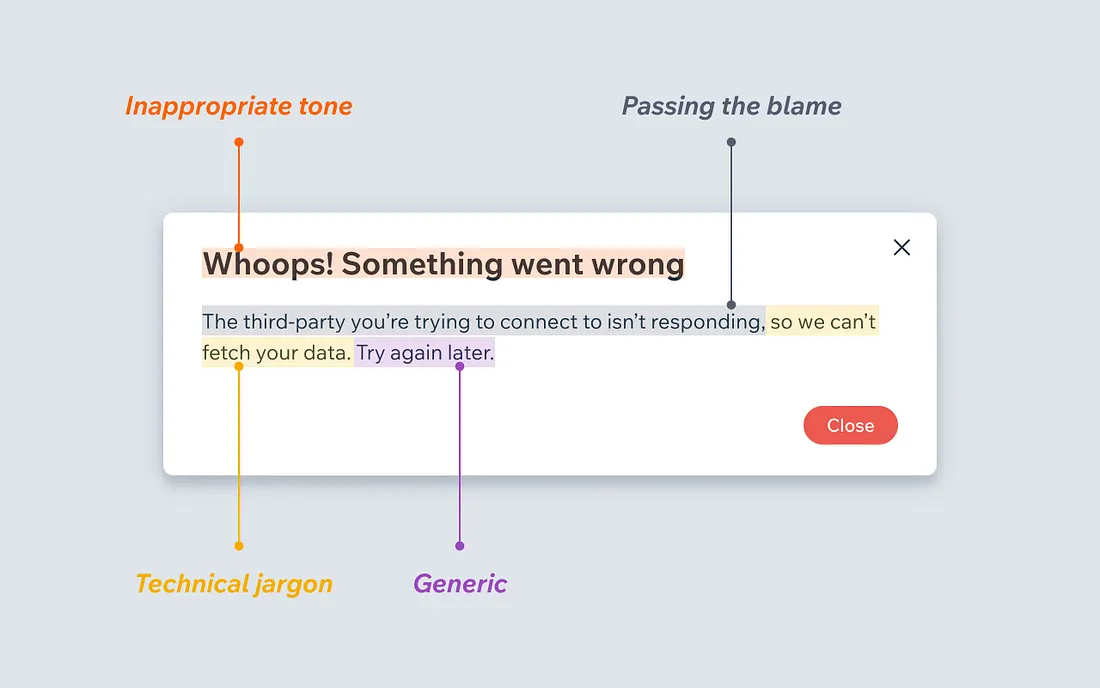
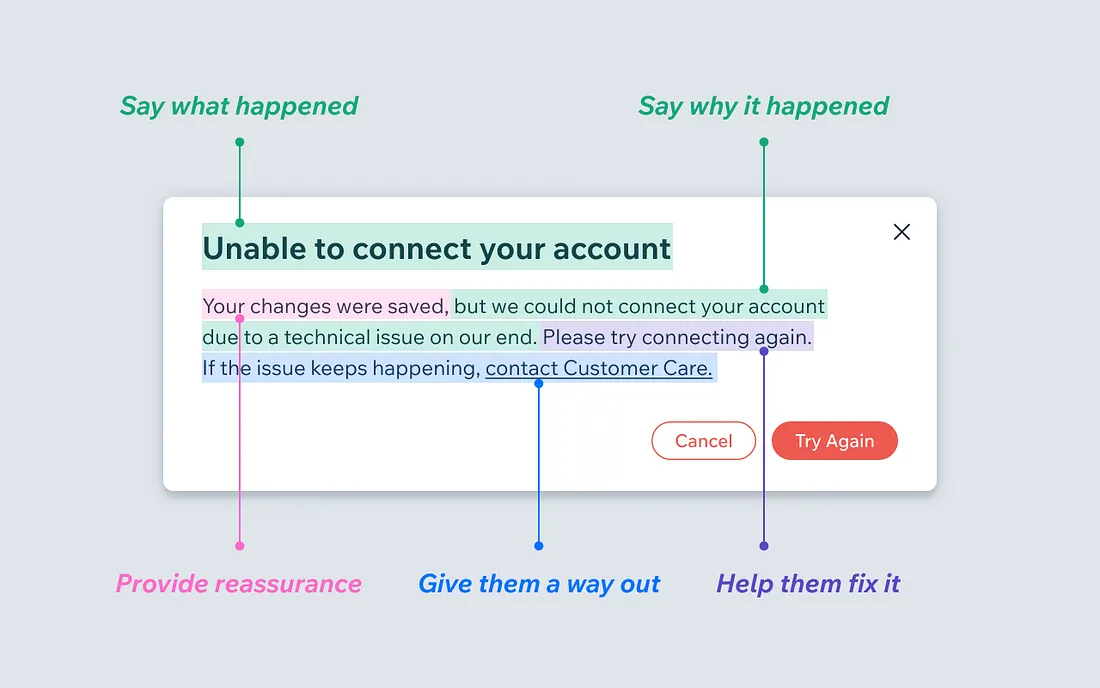
Source: When life gives you lemons, write better error messages, Wix UX, Jenni Nadler, Medium
Improving: Visual
Next week!
- Harmonize a font used by the browser. Not all inputs may use the same font by default.
- Font size at least 16px or higher.
- Try to match field length and structure to the intended input size.
- Prefer one column forums, with labels above the inputs.
Improving: Responsive design
Next week!

Improving: Valid, invalid, focus, ...
Next week!
We can style the form using CSS to enhance the notion of valid and invalid state.
You can use :valid, :invalid, :focus, :autofill
:user-valid, :user-invalid pseudo-classes.
There are also other more specific one.
We need JavaScript for more advanced functionality!
ReCodEx
Join the group!
Assignment
You have 6 days to complete the assignment.
Help Desk Agent Registration Form
Create a form for help desk registration. The form must contain all specified fields with given name attributes (in braces). Submit the form to submission endpoint. Do not forget to validate your website. You are allowed, and encouraged to use AI to complete this assignment.
Your form must contain hidden field author, which is set to your username in GitLab.
You should now have access to https://gitlab.mff.cuni.cz/teaching/nswi142/2026-27/{firstname-lastname} repository. Upload your form into your GitLab repository as a single file to "./02-html-form/form.html". Upload "./02-html-form/README.md" where you briefly explain if and how you used AI assistance.